Yesterday, 21 October, the team behind PHP pushed out an emergency fix for two bugs. They’ve scored them 9.2 out of 10, and someone has christened the pair PHP2Shell. If you run a WordPress site, or pay someone to run one for you, this one needs ten minutes of your attention this week. Not because the sky is falling, but because the usual advice doesn’t work here. You can update WordPress, update every plugin and run a security plugin, and your site will be exactly as exposed as it was before.
I’ve spent the last two days reading the PHP team’s own notes, the write-up from the researchers who found the bugs, and the updates from Cloudflare and the big hosting companies. This is what I’d tell a client who rang me and asked “do I need to worry about this?”
So what is PHP2Shell?
Quick bit of background. WordPress is written in a language called PHP. Think of PHP as the engine, and WordPress, your theme and your plugins as the car built round it. Every WordPress site runs on it, and so does a huge slice of the rest of the web.
The two bugs are in the engine, not the car. Both come down to what PHP does when a request falls over halfway through, say because it ran out of memory while someone was uploading a file. PHP tidies up badly in that moment and leaves bits of half-finished data lying around, and the next request to come along can be tricked into picking them up. Someone who knows exactly what to send can turn that into running their own code on your server. No login, no password, no admin account. And it all happens before WordPress has even started loading, which is why nothing inside WordPress can get in the way.
Researchers at a security firm called Wiz found them back in August, working with OpenAI and a smaller outfit called Calif. They used AI to help dig them out, which is a whole other article. The PHP team got the report on 24 August and spent the best part of two months on a fix. Then the details leaked just before the planned release, so working attack code was doing the rounds before most hosts had anything to patch with. Cloudflare says it was blocking live attempts from just after 4am UK time on the 21st, around nine hours before the fix went public.
If you want one number: 9.2 out of 10 on the standard severity scale, for both of them. Anything over 9 is the “drop what you’re doing” end.
Why the Update button won’t save you
This is the bit most site owners miss. When WordPress itself has a security hole, you get a notice in your dashboard, you click Update, and it’s gone. Often WordPress updates itself overnight. That’s how the WP2Shell flaw in July was dealt with.
PHP2Shell is different. PHP isn’t installed by WordPress. It’s installed on the server by whoever runs the server. On a shared or managed hosting plan, that’s your hosting company. On a VPS or your own server, that’s you or your developer. The fix is a new version of PHP, and someone with server access has to install it.
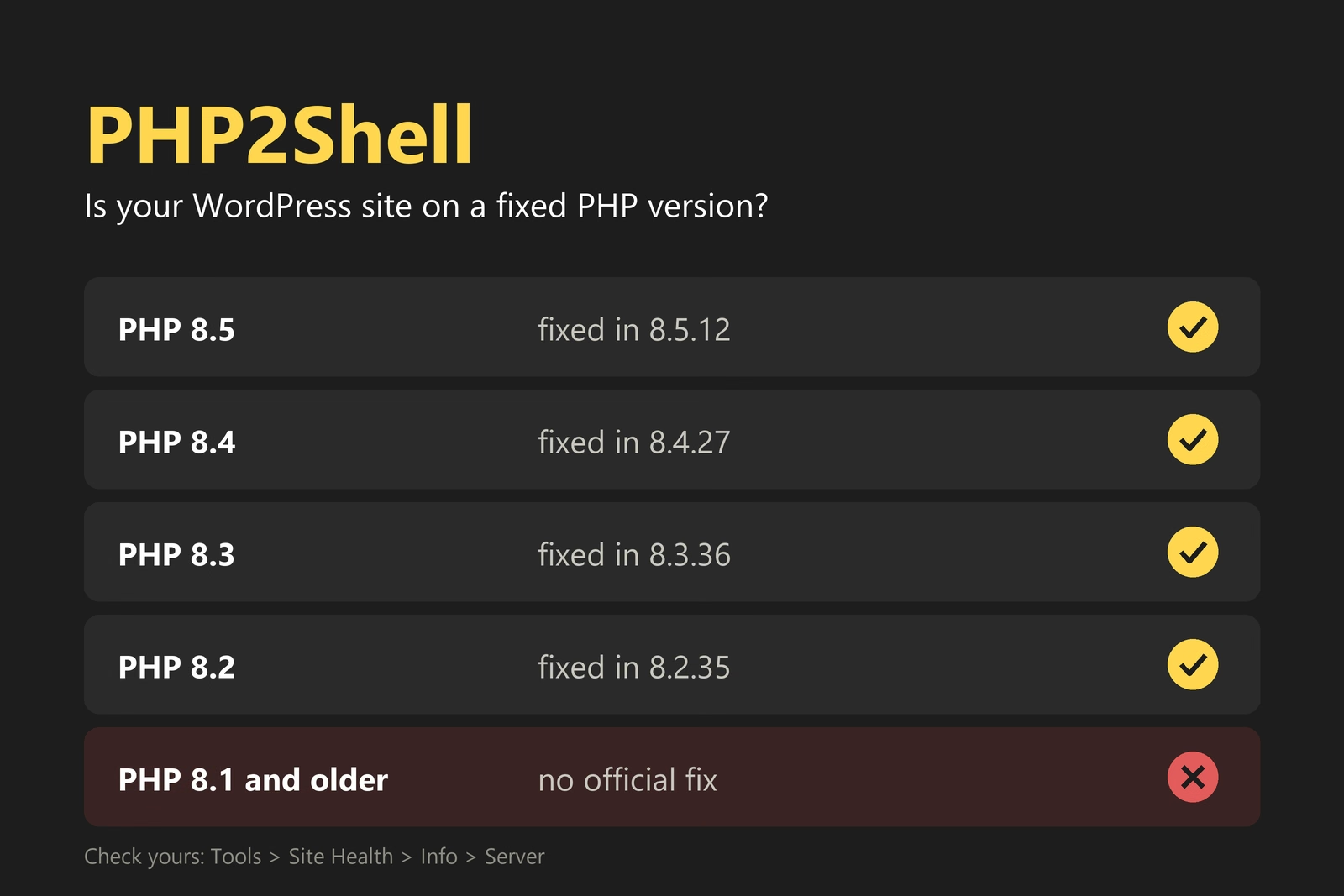
These are the versions that have the fix:
| PHP branch | Fixed version | What that means for you |
|---|---|---|
| PHP 8.5 | 8.5.12 or later | Safe |
| PHP 8.4 | 8.4.27 or later | Safe |
| PHP 8.3 | 8.3.36 or later | Safe |
| PHP 8.2 | 8.2.35 or later | Safe for now. PHP 8.2 stops getting any fixes on 31 December 2026, so plan a move to 8.3 or newer. |
| PHP 8.1, 8.0, 7.4 and older | No official release | The PHP team no longer supports these. Some hosts and Linux vendors have made their own patches. If yours hasn’t, the only real fix is moving to a newer PHP. |
That last row is the problem. WordPress.org’s own statistics, which I checked on 22 October, show that about 36% of WordPress sites are running PHP 8.1 or older. That’s more than a third of the WordPress sites in the world sitting on a version of PHP that has no official fix for a 9.2 severity bug.
How to check your own site in two minutes
You don’t need a developer for this bit.
- Log in to your WordPress dashboard.
- Go to Tools, then Site Health.
- Click the Info tab at the top.
- Open the Server section.
- Read the line that says PHP version.

Then hold that number up against the table. 8.5.12, 8.4.27, 8.3.36, 8.2.35 or anything higher in the same branch, and you can stop reading and get on with your day. Lower than that, and your host hasn’t got round to it yet. Starts with a 7, or 8.0, or 8.1? Then you’ve got two problems, because this bug is sitting on top of a version of PHP that stopped getting any security fixes a good while ago.
While you’re in Site Health, glance at the WordPress version too. WordPress had its own serious flaw in July, and anything older than 6.9.5 or 7.0.2 still has it. Most sites updated themselves, but it’s worth the ten seconds to look.
What to do, depending on who runs your server
You’re on shared or managed hosting
This covers most small business sites: GoDaddy, Hostinger, SiteGround, 20i, Krystal, IONOS, Kinsta, WP Engine and so on. Your host has to install the fix. Most of the big names had it rolled out within a day or two of the release. Hostinger, to pick one, had it done by 7:44am UK time on 22 October and emailed everyone to say so.
If Site Health shows you an unpatched version, raise a ticket with your host. Short and specific gets you a faster answer. I’d send something like this:
Hi. My site at example.co.uk is on PHP [version from Site Health]. When will it be updated to a version that fixes CVE-2026-109618 and CVE-2026-109619 (PHP2Shell)? If I’m meant to change the PHP version myself in the control panel, which one should I pick? Thanks.
Those two reference numbers are what the bugs are called officially. Putting them in the ticket means the support person can’t fob you off with “just update WordPress”.
Plenty of hosts let you pick your own PHP version from the control panel, and the fixed one may already be sitting there waiting. It’ll be under something like “PHP version”, “PHP Selector” or “MultiPHP”. Before you flip it, check your theme and plugins are happy on the newer version. Anything built in the last three years will be. If the site’s older than that, take a backup and do it when you’ve got half an hour spare to click round the site afterwards.
You’ve got your own VPS or server
Pull the update from your operating system’s package repository and restart PHP-FPM or Apache. The main distributions had patched packages out within hours of the release, though a couple of the third-party repositories lagged behind. Check the version with php -v afterwards. If you’re building PHP from source on 7.4, 8.0 or 8.1, the PHP team published minimal patches on GitHub for those branches, but they’re not full releases and they won’t be maintained.
If you can’t patch straight away, the PHP team listed some stopgaps. Turning off the session upload progress feature and removing the memory limit are the two they lead with. Be honest with yourself about these: the PHP team’s own words are that they reduce exposure but don’t make an installation safe. They buy you hours, not weeks.
You’re on PHP 8.1 or older
Move. A good host will have a newer PHP version available at the click of a button. If yours doesn’t, that tells you something about the host. PHP 8.1 stopped getting security fixes at the end of 2025, and 7.4 in 2022. Sites still on them have been running on borrowed time since before this bug came along.
The move is usually painless. Take a backup, switch to 8.3 in the hosting panel, and click through your site. If something breaks, it’s nearly always one old plugin, and switching back takes the same click. Then replace the plugin.
A firewall buys you time, not a fix
Cloudflare added protection for both bugs to every plan, including the free one, before the flaws were made public. If your site goes through Cloudflare, attempts to use these bugs are being blocked at the edge, before they ever reach your server. Server-side security tools like Imunify360 have added their own rules for it too.
That’s genuinely reassuring, and it’s why the first days of this haven’t been the bloodbath some people predicted. But Cloudflare’s own post says attackers were already changing their attack patterns to try and slip past the rules, and a firewall only sees traffic that goes through it. Treat the firewall as the seatbelt. The PHP update is the brakes.
Two cheap things help while you’re waiting on a patch. If nobody needs to upload files to your site, switch uploads off at the firewall or web server. If they do, bring the upload size limit down to something sensible instead of the hundreds of megabytes some hosting panels hand out by default. Both bugs are poked through uploads and memory, so the smaller the request you’ll accept, the less room there is to work in.
How to tell if you’ve already been hit
Attack code was in the wild before the patch, so “am I patched?” isn’t the only question. “Was I hit before the patch landed?” matters too. Six checks, in order of how quick they are:
- Users. Go to Users in your dashboard and look at the Administrator list. Anyone you don’t recognise is a red flag. Attackers add an admin account so they can get back in after you fix the hole they came through.
- Plugins. Look at the Plugins page for anything you didn’t install, especially with a generic name like “WP Core Helper” or “Security Patch”. Then ask your host or developer to check the mu-plugins folder, which doesn’t show up in the normal list.
- Google. Search for
site:yourdomain.co.uk. If you see pages about pharmaceuticals, casinos or designer handbags that you didn’t write, your site is being used for spam. - Search Console. If you’ve got it set up, open Security Issues. Google will usually flag malware or a hack it has spotted on your site, though it can be slow about it, so look again in a week.
- The uploads folder. Get whoever has file access to look inside wp-content/uploads for anything ending in .php. That folder is for images, PDFs and the like, nothing else. A PHP file in there is nearly always a back door.
- Host scan and logs. Most hosts offer a malware scan in the control panel. Run it. If your host gives you access to error logs, look for bursts of “Allowed memory size exhausted” errors or repeated 500 errors from the past fortnight. That’s the fingerprint of someone trying this attack.
If any of that turns something up, resist the urge to delete the odd file and carry on. Once someone has had code running on your server you should assume they’ve left themselves more than one way back in. The route I’d take: get PHP patched, put the site back from a backup taken before the attack, change every password you can think of (WordPress, hosting, FTP, database), and have your host swap the WordPress security keys. No clean backup? Your host or a WordPress developer can clean it by hand, but it’ll cost more than the backup would have.
What this should change about how you run your site
The lesson from PHP2Shell isn’t really about PHP2Shell. It’s that a chunk of your site’s security lives outside WordPress, in a place you can’t see from the dashboard, and someone needs to own it. If you don’t know who owns it for your site, that’s the gap.
Three habits that would have made this a non-event:
- Know your PHP version and keep it on a supported branch. Right now that means 8.2 at the very least, and 8.3 or newer from January.
- Put your site behind a firewall that gets updated by someone else. Cloudflare’s free plan is the obvious choice for a small business.
- Have a backup you’ve tested, held somewhere other than the server it’s backing up. Not because of this bug. Because of the next one.
If your site is with a host or a web company that handles all of this, the right move is to email them one line: “Are your servers patched for PHP2Shell?” A good one will answer in a sentence. A bad one will ask what you mean.
For our own customers, the answer is yes. Every site we look after sits behind Cloudflare, which was blocking these attacks before they were made public, and our servers run Imunify360, which has its own rules for this attack. The servers themselves were updated to PHP 8.5.12, the fixed version, and there’s nothing you need to do. Keeping PHP patched is part of what the monthly fee pays for, and this is exactly the sort of week it’s for.
PHP2Shell questions
Does updating WordPress fix PHP2Shell?
No. The bugs are in PHP, the software WordPress runs on, not in WordPress itself. The fix is a new version of PHP installed on the server, which on most hosting plans is your host's job. Updating WordPress and your plugins is still worth doing, but it does nothing for this one.
Will a security plugin protect me?
Not from this. A security plugin runs inside PHP, and this attack happens in PHP's own start-up, before any plugin has loaded. A firewall that sits in front of the server, such as Cloudflare or a server-level tool like Imunify360, can block the attack. A plugin can't.
Should I take my site offline until it's patched?
Only if your host can't patch and you have no firewall in front of the site. A maintenance mode plugin doesn't help, because PHP is still the thing answering every request. If you're behind Cloudflare, you're already protected while you wait.
My host says they've patched. How do I check?
Go to Tools, Site Health, Info, then open the Server section and read the PHP version line. You want 8.5.12, 8.4.27, 8.3.36 or 8.2.35, or anything higher within the same branch. If the number is lower, ask the host again.
I'm on PHP 7.4 or 8.1 and my host says it's fixed. Can that be true?
It can. Some Linux vendors and hosting companies patch old versions themselves without changing the version number, so the number alone doesn't tell you. Ask the host to confirm in writing that their PHP 7.4 or 8.1 build includes the fix for CVE-2026-109618 and CVE-2026-109619. And still plan to move to a supported version, because that kind of patching only lasts as long as the host's goodwill.
Are Ubie Websites customers affected?
No. Our servers run PHP 8.5.12, the fixed version, and every site we host sits behind Cloudflare, which was blocking this attack before it was made public, with Imunify360 on the server as a second line. There's nothing you need to do.